rickgaribay.net

Space shuttles aren't built for rocket scientists, they're built for astronauts. The goal isn't the ship, its the moon.
posts - 258, comments - 163, trackbacks - 28

My Links

News

Where's Rick?


Visual Studio Connections, 3/26

That Conference, 8/13


About Me
I am a developer, architect, writer and speaker, passionate about distributed .NET technologies and Application Lifecycle Management. I am currently the General Manager of the Connected Systems Practice at Neudesic.


    follow me on Twitter


    Archives

    Post Categories

    Published Works

    Disabling Time Synchronization with Hyper-V

    Ben Armstrong has saved us all several agonizing hours with this great, simple blog post about how to disable time synchronization in Virtual PC. In short, the process entails opening the .vmc file and updating the enabled flag to "false" within the host_time_sync element:

    <host_time_sync> 
          <enabled type="boolean">false</enabled> 
    </host_time_sync>

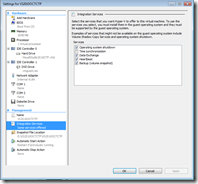
    Fortunately, disabling time synchronization in Hyper-V is as simple as clearing a check box. Right click the VM in question, select Settings, and choose Integration Services under Management. Next, simply clear the "Time synchronization" feature and hit OK:
    image 


    When might you want to disable time synchronization? Ben's post got me out a bind once when doing a presentation on a VPC OS that was about to brick due to expiration lockout. Brian Keller, Developer Evangelist at Microsoft points out some tips for beating CTP expirations here. In my case, I converted the VS 2010 .NET 4.0 VPC to Hyper-V which Grant Holliday captures well here.

    Of course, I do not recommend or advocate this as a means to cheat or steal, but it may come in handy should the process be sanctioned by the particular software vendor.

    Hope this helps!

    Print | posted on Tuesday, April 28, 2009 6:45 PM | Filed Under [ Misc. ]

    Feedback

    Gravatar

    # re: Disabling Time Synchronization with Hyper-V

    hello, disable the time syncronization screen as shown in this doc, but when I make the restart of the VM it back to synchronize the date and time with the host. could you tell me if there is another way, for example where the resgisters can disable this function?

    now, thank you.

    Murilo Rodrigues
    6/7/2011 1:52 PM | Murilo Rodrigues
    Comments have been closed on this topic.

    Powered by: